Share Your Availability
as Paste-Ready Text
Copy your free times in 10 seconds. No booking links.
Connect your calendar:
Free · Read-only access · Nothing is shared without you
How it works
Share your availability in ten seconds
Connect Google, Outlook, or Apple Calendar. Get paste-ready free times — no booking link.
Connect
Google or Outlook in one click, or paste a public Apple Calendar link. Read-only busy/free only.
Generate
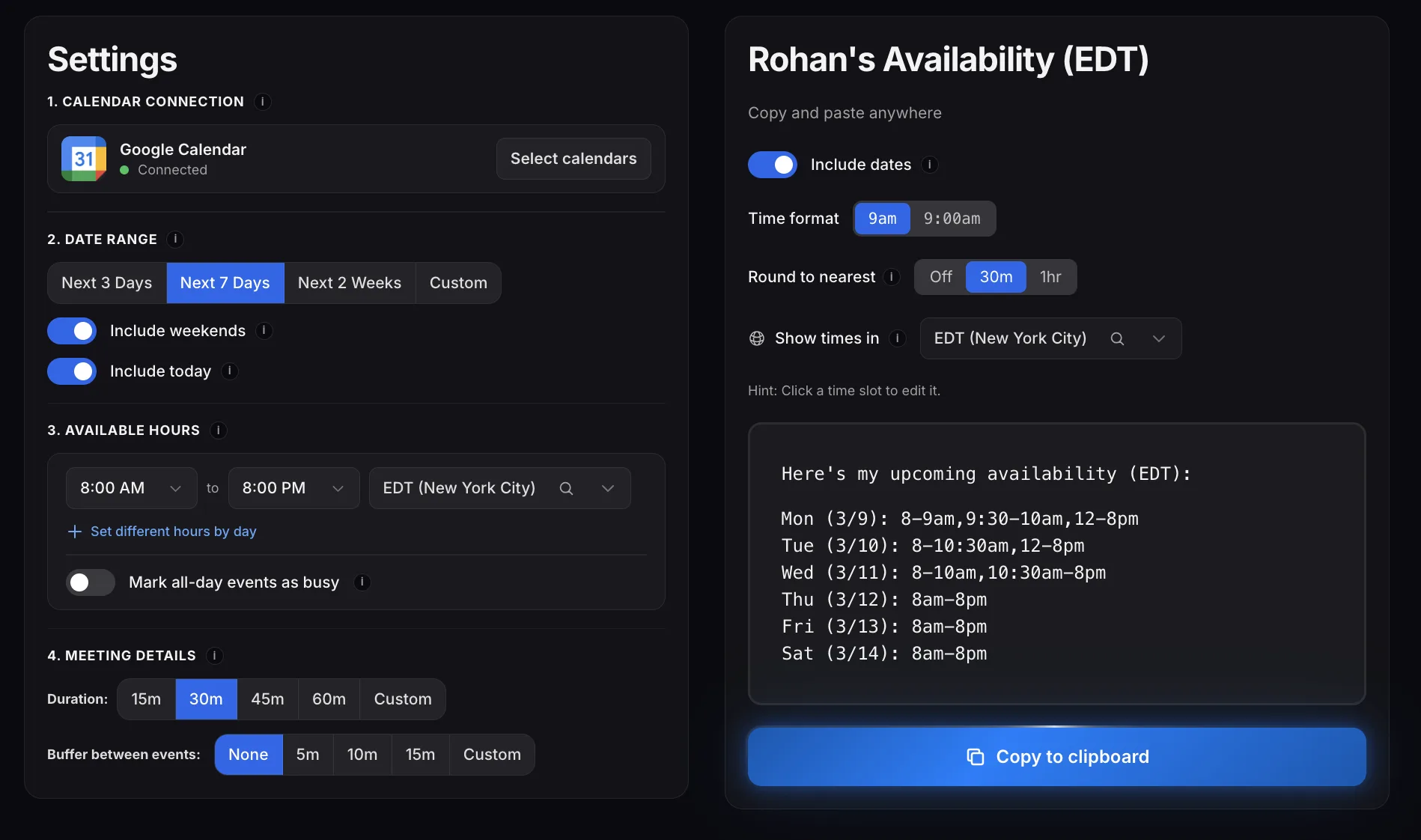
Pick your date range and working hours. Your free slots appear as clean, copy-ready text.
Paste anywhere
Paste into email, Slack, iMessage, LinkedIn, or wherever the conversation already lives.
Fully customizable
Dial in exactly how you want
your availability to look
Working hours
Set different hours per day or use the same schedule all week
Buffer time
Add breathing room between meetings automatically
Round to nearest
Snap times to clean 30-minute or 1-hour boundaries
Date range
Next 3 days, 7 days, 2 weeks, or a custom range
Timezone control
Generate in any timezone and include the label
Time format & more
12h or 24h, bold days, include dates, and more
Compare
ShareAvailability vs. Calendly & others
| Feature |  ShareAvailability ShareAvailability |  Calendly Calendly | Typing manually |
|---|---|---|---|
| No booking link needed | |||
| Output feels like you wrote it | |||
| Takes under a minute | |||
| Minimizes human error | |||
| Auto-books the meeting | |||
| Free |
ShareAvailability is perfect for personal conversations where the relationship matters more than the automation.
Built for
Share calendar availability
without a scheduling link
Coffee Chats
Don't be that person sending a formal calendar link just for a friendly coffee.
Job Interviews
Sending a booking link to a recruiter is the fastest way to lose the job.
Salespeople
Nothing cools a warm lead faster than a cold Calendly link.
Students
Be the hero of the group chat by actually picking a time instead of just asking "wbu?"
Client Calls
Give VIPs the white-glove treatment, not a data entry task.
Real Estate Agents
Text showing times before they call the next agent.
Multiple calendars
Check multiple calendars
for conflicts at once
Google, Outlook, Apple — work and personal. Select which ones to check, and ShareAvailability merges busy times so you share your actual free slots.
Select your calendars
Pick Google, Outlook, and/or an Apple Calendar link. Work, personal, shared — all supported.
Conflicts merged automatically
Overlapping events across calendars are combined into a single busy block. No duplicates, no confusion.
One clean availability list
Your free times reflect every calendar you selected. Copy, paste, and share with confidence.
The sweet spot
Copy-paste availability
without a booking link
ShareAvailability gives you a clean, copy-paste-ready list of your free times, so you can share your availability without a calendar booking link.
Here's my Calendly:
https://calendly.com/jsmith/30min
Impersonal
- ✕Feels transactional—awkward for casual or professional emails
- ✕Paid plans required for basic customization and calendar integrations
ShareAvailabilityHere are some times that work:
Tue: 10am–12pm, 2–4pm
Wed: 9–11am
Thu: 1–3pm
Just right
- ✓Reads Google, Outlook, or Apple Calendar and formats your free slots instantly
- ✓Copy & paste into any email, Slack message, or text—zero friction for the recipient
I think I'm free Tuesday after 10 maybe? Or wait, I have that thing at 2... Wednesday works too I think? Let me check...
Tedious & error-prone
- ✕Switching between your calendar and email wastes time every single meeting
- ✕Easy to miss conflicts—double-bookings lead to embarrassing reschedules
Privacy-first
Your calendar stays yours
Read-only access
We see busy/free. That's it. Never event names, attendees, or descriptions. Can never edit or delete.
Nothing stored
Calendar data is fetched once, used to calculate your free slots, then immediately discarded.
OAuth 2.0
Industry-standard auth. Same protocol used by Google, Slack, Zoom, and every major platform.
Use cases
Built for the conversations where a booking link feels wrong
Interviews, coffee chats, client calls, Slack, Gmail, and more — each with a realistic example message.
FAQ
ShareAvailability FAQ
What is ShareAvailability?
What is ShareAvailability?
ShareAvailability is a free web tool that connects to Google Calendar, Outlook / Microsoft 365, or Apple Calendar and generates a plain-text list of your available times. Instead of sending someone a booking link like Calendly, you get a clean, formatted list you can copy and paste into any email, text, Slack message, LinkedIn DM, or WhatsApp conversation. The entire process takes about ten seconds. Connect a calendar, choose your date range, working hours, timezone, and meeting duration, then click Generate. The output looks like you typed it out yourself — something like "Tue (3/25): 9-11am, 2-4pm" — but it is automatically pulled from your actual schedule. ShareAvailability uses read-only access for Google and Outlook — it can never create, edit, or delete events. Apple Calendar works by pasting a public iCloud calendar link (no Apple sign-in). You can combine multiple calendars so free/busy is merged and you avoid double-booking. There are no paid tiers and no account is required for the recipient.
How do I share my calendar availability as text?
How do I share my calendar availability as text?
To share your calendar availability as text, go to ShareAvailability.com and connect Google Calendar, Outlook, or Apple Calendar. Google and Outlook use one-click sign-in with read-only access; Apple Calendar uses a public iCloud or .ics link you paste in — no Apple ID sign-in. Once connected, select your preferred date range (for example, the next five business days), set your working hours (such as 9am to 5pm), choose your timezone, and pick a minimum meeting duration. Click Generate, and ShareAvailability scans your selected calendars to produce a formatted, plain-text list of your open time slots. The output follows a clear format — day, date, and time range on each line — with the timezone noted at the top. Copy the text with one click, then paste it directly into whatever channel you are using to schedule: email, Slack, text message, or any other messaging platform. No booking link is involved at any point.
How to share your calendar availability without a link?
How to share your calendar availability without a link?
With ShareAvailability, you never need to send a booking link. The tool reads busy/free from Google Calendar, Outlook, or Apple Calendar, identifies your free time slots across connected calendars, and outputs a plain-text list formatted with day, date, and time ranges. You copy that text and paste it directly into an email, Slack message, text, LinkedIn DM, or WhatsApp conversation. The recipient reads your availability in the body of your message and replies with what works — no external website to visit, no form to fill out, no account to create. This approach is especially useful in situations where a booking link feels impersonal, such as coffee chats, job interviews, client outreach, and networking. The output looks like you typed it yourself because it is plain text, but it is generated automatically from your actual schedule in about ten seconds. It works everywhere text works. Learn more about sharing calendar availability as text.
Is it safe to connect my calendar?
Is it safe to connect my calendar?
Yes. For Google and Outlook / Microsoft 365, ShareAvailability uses OAuth 2.0 with read-only calendar access — it can see when you are busy or free, but it cannot create, edit, or delete events. It never stores event titles, descriptions, attendees, locations, or other event details. When you click Generate, it reads busy/free times, builds your plain-text list, and discards the calendar data. What we do keep (so the app works when you come back) is your account basics — email, name, and avatar from the sign-in provider — plus your timezone, saved preferences, which calendars you selected, and anonymous usage events that help us keep the product reliable. Apple Calendar never uses Apple sign-in: you paste a public iCloud calendar link, and that feed stays on your device. We do not sell your data or use it for advertising. You can revoke Google or Microsoft access anytime in your account settings, and you can ask us to delete your account data — see our Privacy Policy for details.
Why share availability as text instead of a booking link?
Why share availability as text instead of a booking link?
Sharing availability as plain text instead of a booking link changes the tone of the scheduling interaction. A booking link says "schedule yourself into my calendar," which can feel transactional and one-sided. A plain-text list of your free times says "here are some times that work — what is good for you?" That small difference matters in relationship-driven contexts like coffee chats, job interviews, client conversations, sales outreach, and networking. When you paste your availability directly into a message, the other person reads it naturally as part of the conversation. They do not need to click away to a separate website, create an account, or navigate a scheduling interface. It also works in every channel — email, Slack, text, WhatsApp, LinkedIn — whereas booking links are designed primarily for email. Plain-text scheduling keeps the human element intact while still saving you the time of manually checking your calendar.
Is ShareAvailability a Calendly alternative?
Is ShareAvailability a Calendly alternative?
ShareAvailability and Calendly solve different scheduling problems. Calendly is a booking platform — you send someone a link, they visit a web page, pick a time slot, and the meeting is automatically created on both calendars. It is ideal for high-volume scheduling like sales demos, client consultations, and public appointment pages. ShareAvailability is a plain-text availability tool — it reads Google Calendar, Outlook, or Apple Calendar and gives you a copy-paste list of your free times. There is no link, no booking page, and no account required for the recipient. ShareAvailability is the better fit when the scheduling context calls for a personal touch: networking, job interviews, client relationship management, or any conversation where sending a booking link would feel impersonal. Many people use both tools — Calendly for inbound appointment booking and ShareAvailability for relationship-driven, conversational scheduling. ShareAvailability is completely free with no paid tiers. See how ShareAvailability compares to Calendly.
Is ShareAvailability free?
Is ShareAvailability free?
Yes, ShareAvailability is completely free. There are no paid tiers, no premium features locked behind a paywall, no usage limits, and no trial periods. Every feature — including multiple calendar support, timezone selection, custom working hours, buffer time between meetings, and flexible date ranges — is available to every user at no cost. The recipient of your availability does not need an account or sign-up either. We built ShareAvailability to solve a specific problem — making it fast and easy to share your calendar availability as plain text — and we believe the core tool should be free for everyone. There are no feature gates, no credit card requirements, and no upsells. You can use it as many times as you want, for as many scheduling conversations as you need, without ever paying anything.
Can I combine Google, Outlook, and Apple calendars?
Can I combine Google, Outlook, and Apple calendars?
Yes. ShareAvailability lets you connect more than one source and merges free/busy across everything you select. Sign in with Google, add Outlook / Microsoft 365, and paste a public Apple Calendar link — or any subset of those — then choose which calendars to include when you Generate. Overlapping busy blocks are combined so the plain-text list reflects your true open slots. That prevents offering a time that looks free on work Outlook but is blocked on a personal Google calendar or an iCloud feed. You pick which calendars count each time, so you stay in control. Most built-in scheduling features only check a primary calendar; ShareAvailability checks every source you choose.
Does Outlook work with work Microsoft 365 accounts?
Does Outlook work with work Microsoft 365 accounts?
Yes. Sign in with Microsoft to connect Outlook and Microsoft 365 calendars — including work and school accounts — with read-only access. ShareAvailability sees busy/free times only; it cannot create, edit, or delete events, and it does not store event titles or attendees. If your org uses Microsoft 365, use the same work account you already use for Outlook. You can keep Google or an Apple Calendar link connected at the same time so personal and work schedules are both considered when you generate availability.
How do Apple Calendar links work?
How do Apple Calendar links work?
Apple Calendar does not use Apple sign-in. Publish the calendar as public in the Calendar app on Mac or iPhone, or on iCloud.com, then copy the webcal:// or https:// link and paste it under Apple Calendar in ShareAvailability. Generic public .ics feeds work the same way. The link stays on your device; ShareAvailability reads busy/free from that feed when you Generate. Recipients never see the feed URL — they only get the plain-text availability list you copy. If you stop sharing the calendar publicly in iCloud, the link stops working. You can remove the pasted link anytime from the app.
Does ShareAvailability work with Outlook or Apple Calendar?
Does ShareAvailability work with Outlook or Apple Calendar?
ShareAvailability supports Google Calendar and Microsoft Outlook / Microsoft 365 calendars (sign in with Microsoft for read-only calendar access). Apple Calendar / iCloud works without signing in: publish the calendar as public in the Calendar app (or on iCloud.com), copy the webcal:// or https:// link, and paste it under Apple Calendar on the app. Generic public .ics feeds work the same way.
Does ShareAvailability show my calendar events to anyone?
Does ShareAvailability show my calendar events to anyone?
No. ShareAvailability never displays, shares, or stores your actual calendar events. The tool only calculates your open time slots and outputs them as plain text. It reads your calendar to determine when you are busy, but it does not access event names, descriptions, attendees, locations, meeting links, or any other event details. The only information that appears in the output is the days and times when you are free — nothing about what you are doing when you are busy. Your calendar data is fetched on demand when you click Generate and is immediately discarded after producing the availability list. No event data is stored on any server, logged, or transmitted to any third party. The recipient of your availability text only sees your free times, formatted as a clean list — they have no access to your calendar whatsoever.
Your availability.
Plain text. One click.
Free to use. Connect Google, Outlook, or Apple Calendar to get started.
Not sure if ShareAvailability is right for you?
Click your favorite AI and get the answer instantly


Get scheduling tips & product updates
New features, availability-sharing tricks, and the occasional Calendly roast. No spam.